

Call of Duty: Modern Warfare 4 is built around fast gunfights, fluid movement and precise control. If you play on keyboard and mouse, Hall Effect settings such as actuation distance, Rapid Trigger, dead zones and polling rate can change how your movement keys feel — but the smallest possible number is not automatically the best setting.
Quick Answer: MW4 Keyboard Settings to Test First
For most Modern Warfare 4 keyboard players, start with a moderate Hall Effect profile instead of immediately setting every key to the minimum value.
- WASD Actuation: Around 0.5–1.0 mm.
- WASD Rapid Trigger: Around 0.1–0.3 mm.
- Utility / Interaction Keys: Around 1.0–1.5 mm.
- Polling Rate: Start at 1K; compare 4K or 8K only if supported and stable.
- Dead Zones: Keep them conservative unless you are correcting a specific stability problem.
Then increase sensitivity gradually by lowering movement thresholds. The goal is not to reach the smallest number your keyboard allows. The goal is to find the lowest setting that still produces exactly the movement you intend.
1. Which Keyboard Settings Actually Matter in Modern Warfare 4?
Modern Warfare 4 launched on October 23, 2026, with Multiplayer built around grounded, precise combat and fluid movement. Season 1 arrives November 6, bringing additional Multiplayer maps, modes and broader Warzone content.
That makes MW4 a useful example of why keyboard tuning should focus on movement control rather than chasing one headline specification.
For keyboard players, the main settings to understand are:
- Actuation Point: Controls how far you press before the first keypress activates.
- Rapid Trigger: Controls how much movement is required for dynamic reset and re-activation.
- Dead Zone: Helps define how firmware handles tiny movements near specific parts of key travel.
- Polling Rate: Describes how frequently the keyboard can report to the host.
- Scan Rate: Describes how frequently the keyboard samples input internally under the manufacturer's implementation.
2. Three MW4 Hall Effect Profiles to Start With
There is no universal “best” setting for every player. Finger pressure, switch feel, movement technique and keyboard firmware all change how an aggressive profile feels.
The following values are editorial starting points, not official Call of Duty recommendations or measured optima. Use only options supported by your model and firmware. If separate RT press and release thresholds are available, start with both in the suggested RT range and change one at a time.
| Setting | Balanced | Aggressive FPS | Safer / New User |
|---|---|---|---|
| WASD Actuation | 0.5–1.0 mm | 0.2–0.5 mm | 1.0–1.5 mm |
| WASD Rapid Trigger | 0.1–0.3 mm | 0.05–0.1 mm | 0.3–0.5 mm |
| Space / Movement Keys — Actuation | 0.7–1.2 mm | 0.4–0.8 mm | 1.0–1.5 mm |
| Reload / Interact / Utility — Actuation | 1.0–1.5 mm | 0.8–1.2 mm | 1.2–2.0 mm |
| Dead Zone | Stability first | Tune carefully | Conservative |
| Polling Rate | Start at 1K; test 4K–8K | Up to 8K | Start at 1K |
Balanced
An editorial starting profile for testing responsiveness while leaving more movement margin than the aggressive example.
Aggressive FPS
For experienced players who already understand their keyboard and want shorter movement thresholds on WASD. Test for accidental resets before keeping it.
Safer / New User
A better starting point if extremely shallow actuation or Rapid Trigger causes accidental movement, unwanted re-triggers or inconsistent holds.
3. Best Actuation Point for MW4 Movement Keys
Actuation Point controls the first activation of a key.
If W activates at 0.5 mm, for example, the keyboard reports the first press after the key has moved approximately that configured distance under the keyboard's sensing and firmware system.
A shallow actuation point can make movement feel immediate, but extremely shallow actuation can also make resting your fingers on WASD more likely to create unintended input.
For MW4, a practical starting range for WASD is around 0.5–1.0 mm. Players who already have good finger control can experiment lower.
Keys such as reload, interact, map or other utility bindings usually do not need to be as sensitive as WASD.
That is one of the main advantages of per-key Hall Effect configuration: you do not need to run the same actuation point across the entire board.

4. Best Rapid Trigger Setting for MW4
Rapid Trigger is especially relevant to FPS movement because it changes how reset and re-activation follow key movement.
Traditional switches usually rely on fixed physical or firmware actuation and reset behavior. A Hall Effect keyboard can continuously track position and apply dynamic trigger logic while the key moves.
For movement-heavy gameplay, this can reduce the amount of physical release travel required before a key becomes ready to activate again.
That can be useful during:
- Rapid left-right direction changes.
- Short movement taps.
- Quick peeks and retreats.
- Repeated sprint or movement inputs.
- Fast corrections after stopping or changing direction.
As an editorial starting point, around 0.1–0.3 mm is a sensible place to begin experimenting with Rapid Trigger on WASD.
From there, reduce it gradually and test whether control actually improves.
For a deeper explanation, read the FGG Rapid Trigger Keyboard Guide .
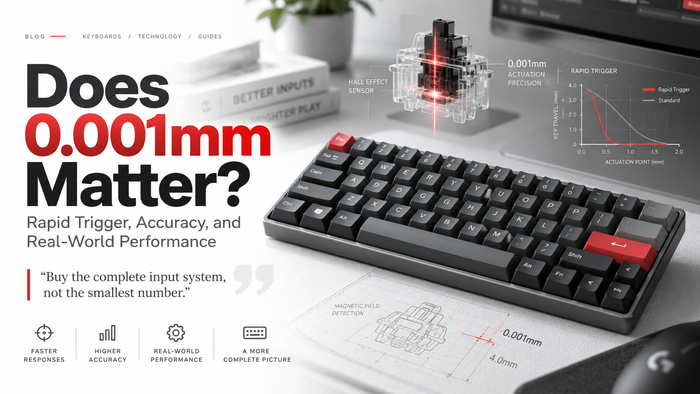
5. Should You Use 0.001mm Rapid Trigger for MW4?
Not automatically.
Some modern Hall Effect keyboards advertise adjustment precision or minimum Rapid Trigger values down to 0.001 mm.
That can be useful as a fine configuration option, but it does not automatically prove one-micron physical repeatability or lower end-to-end latency.
More importantly, most players do not need to run their movement keys at the minimum possible setting.
If you reduce Rapid Trigger until tiny finger-pressure changes begin producing unwanted resets, the setting has stopped helping.
A slightly larger value that behaves predictably is usually more useful than a minimum value that looks impressive in software.
Read: Can You Actually Feel 0.001mm Rapid Trigger? What the Number Really Means .
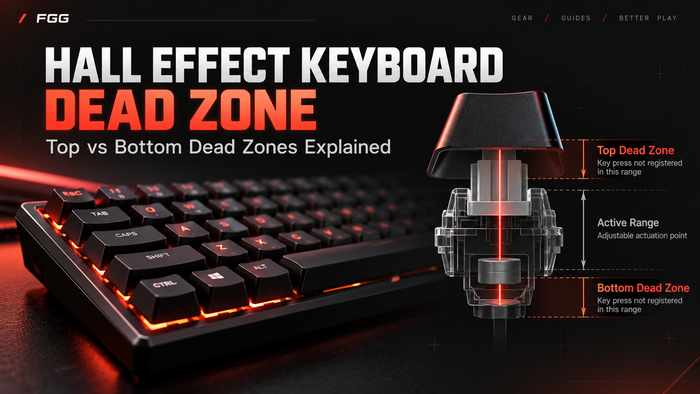
6. How Dead Zone Affects Aggressive MW4 Settings
Dead-zone settings are primarily stability controls.
Depending on the keyboard and firmware, a Top Dead Zone or Bottom Dead Zone can define a small region near one end of key travel where movement is ignored, filtered or treated more conservatively.
This becomes especially relevant when actuation and Rapid Trigger are configured aggressively.
If your movement key:
- Re-triggers from very small pressure changes.
- Briefly releases while you are trying to hold it.
- Feels nervous near the top or bottom of travel.
- Produces inconsistent repeated movement.
Review calibration and Rapid Trigger sensitivity before assuming the switch is defective.
Then review the dead-zone controls available on your specific keyboard.

Read the full Hall Effect Keyboard Dead Zone Guide .
7. Should You Use 8K Polling for Modern Warfare 4?
An 8,000 Hz keyboard polling rate means the keyboard can offer host-report opportunities at a nominal interval of 0.125 milliseconds.
At 1,000 Hz, the nominal interval is 1 millisecond.
| Polling Rate | Nominal Report Interval | Practical Use |
|---|---|---|
| 1,000 Hz | 1 ms | Already fast enough for general gaming |
| 2,000 Hz | 0.5 ms | Higher report frequency |
| 4,000 Hz | 0.25 ms | Good high-polling compromise |
| 8,000 Hz | 0.125 ms | Maximum report frequency on supported 8K boards |
This does not mean an 8K keyboard has 0.125 ms total gameplay latency.
The keyboard still has to sense the key, process the input and report it. Then the operating system, game engine, frame timing, rendering and display all contribute to the final experience.
Start at 1K if you do not yet have a stable baseline. If your keyboard supports higher polling rates, compare 4K or 8K using the same profile and watch for input problems or uneven frame pacing. Keep the rate that behaves reliably on your system.
8. Scan Rate vs Polling Rate: Why They Are Not the Same
Polling rate and scan rate describe different stages of keyboard input.
Polling rate concerns communication from the keyboard to the host. Scan rate concerns internal input sampling under the manufacturer's implementation.
This distinction matters because modern magnetic keyboards sometimes advertise very high scan-rate figures such as 256K.
Those figures should not be converted directly into claims about total keyboard latency.
For example, the current MAD60/68 V2 product page lists 8K polling, 0.001 mm RT precision, 0.08 ms latency and a 256K scan rate.
Those are published product specifications, not independent FGG end-to-end latency measurements.
Read: 256K Scan Rate Explained: Keyboard Scan Rate vs Polling Rate .
9. MW4 Keyboard Settings by Play Style
The best profile depends on how you actually play.
| Play Style | Suggested Direction | Why |
|---|---|---|
| Aggressive / Rush | Shallower WASD actuation + lower RT | Reduces movement required for fast direction changes |
| Balanced Multiplayer | Moderate actuation + moderate RT | Balances responsiveness with predictable holds |
| DMZ / Longer Sessions | Moderate or conservative profile | May help avoid unintended input during sustained holds; comfort depends on the user and switch. |
| New Hall Effect User | Start conservative | Makes it easier to understand which change affects behavior |
Do not tune ten settings at once.
If you change actuation, Rapid Trigger, dead zones and polling simultaneously, you will not know which change actually improved the keyboard.
10. 60% vs 68-Key vs 75% for Modern Warfare 4
Layout does not make a keyboard faster by itself.
Its biggest gaming effect is physical desk space and access to dedicated keys.
| Layout | Main Advantage | Main Trade-Off | Best Fit |
|---|---|---|---|
| 60% | Maximum mouse room | More Fn-layer dependence | Pure FPS / compact desks |
| 68-Key | Compact + dedicated arrows | Slightly wider than 60% | Gaming + easier navigation |
| 75% | F-row + arrows + more shortcuts | Uses more desk width | Gaming + work / one-keyboard setup |
Layout categories are approximate: key count, dedicated keys and case width vary by model. The 68-key examples here refer to compact boards with arrows; compare actual dimensions before buying.
If you use a low mouse sensitivity and regularly make wide arm movements, a compact keyboard can give you more usable mouse-pad area.
If you also work, edit, browse or use F-keys regularly, a 75% layout may be more practical.
For a deeper layout comparison, read: 60% vs 75% Keyboard Layout: Which Is Better for FPS Gaming and Work?
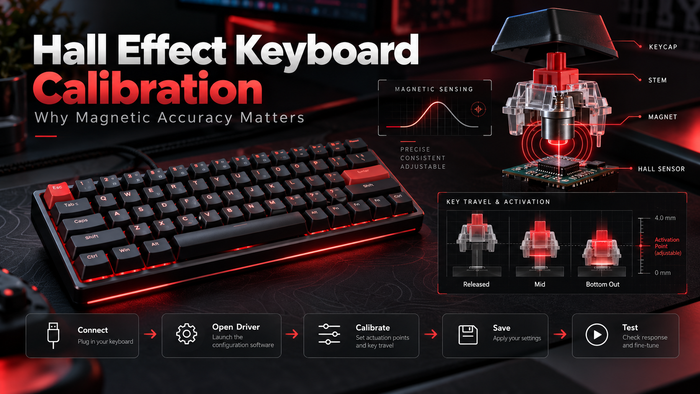
11. How to Tune an MW4 Profile in FGG HUB
If you use a supported FGG / MADLIONS Hall Effect keyboard, the practical process matters more than copying one extreme number.
Make sure the HUB has identified the intended device before changing settings.
Do not use aggressive sensitivity to hide a baseline sensing problem.
Start around a moderate value and test normal movement first.
Reduce movement distance gradually instead of going straight to the minimum.
Check that keys do not release or re-trigger when you do not intend them to.
Use stability controls to solve a specific behavior, not simply because the slider exists.
Use the highest rate your supported configuration handles reliably.
Change one variable at a time and keep the profile only if movement becomes more predictable.

Configure Your Keyboard in FGG HUB
Use the current FGG HUB interface and English reference guide to review actuation, Rapid Trigger, polling options, calibration and available stability controls. Settings and available ranges can vary by keyboard and firmware.
12. What Matters More Than the Smallest Number?
A modern Hall Effect keyboard is a complete system.
The smallest RT number is only one part of that system.
| Factor | Why It Matters |
|---|---|
| Sensor stability | Helps the keyboard distinguish intentional movement from unwanted variation. |
| Calibration | Establishes a reliable reference for key travel. |
| Firmware | Turns sensor data into actual actuation and reset behavior. |
| Rapid Trigger consistency | Repeatable movement matters more than the minimum selectable number. |
| Dead-zone behavior | Can help balance stability and sensitivity. |
| Software usability | Advanced settings are only useful if you can configure and recover them reliably. |
| Layout | Changes desk space and access to dedicated keys. |
| Switch feel | Your physical control depends on how the switch feels under your fingers. |
13. Hall Effect Keyboard Examples for Different MW4 Setups
If you are comparing keyboards for an MW4 setup, the right choice depends more on layout and how you use the board than on one specification.
The following MADLIONS models are sold by FGG, so treat this section as a commercial product reference rather than independent third-party buying advice.
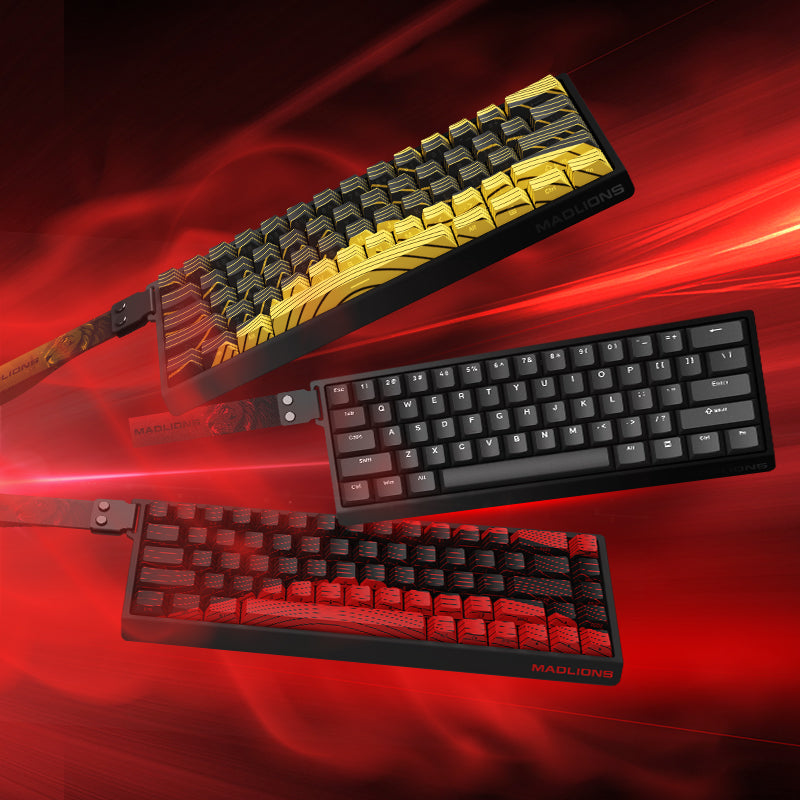
MAD60/68 V2
Available in compact 60% and 68-key configurations. The current FGG product page lists 8K polling, 0.001 mm RT precision, 0.08 ms latency and a 256K scan rate.
Best fit: Players who prioritize compact desk space and per-key Hall Effect tuning.
NANO68 V2
A compact 68-key Hall Effect layout with dedicated arrows. Current published information includes up to 8K polling, 256K scan rate, 0.08 ms latency and Rapid Trigger adjustment down to 0.001 mm.
Best fit: Players who want a small FPS-focused board without giving up dedicated arrow keys.
TITAN 75 Turbo
A 75% Hall Effect keyboard that keeps the function row and arrow keys. FGG's current published specifications include 8K polling, 0.08 ms latency and 0.001 mm Rapid Trigger precision.
Best fit: Players who want one keyboard for FPS gaming, shortcuts and everyday work.
Performance values above are manufacturer / product-page specifications. They are not independent FGG laboratory measurements of end-to-end gameplay latency. Product configurations and firmware can change.
Compare Current Hall Effect Keyboards
Choose by layout, switch feel, configuration controls and the way you actually use your desk — not by the smallest advertised number alone.
14. Final Verdict: The Best MW4 Keyboard Setting Is the One You Can Control
Modern Warfare 4 rewards fast reactions, but aggressive keyboard settings are useful only when they remain predictable.
Start with:
- Moderate WASD actuation.
- Moderate Rapid Trigger.
- Stable dead-zone behavior.
- A polling rate your keyboard and system handle reliably.
Then lower thresholds gradually.
If a smaller value makes movement less consistent, go back up.
Modern Warfare 4 Keyboard Settings FAQ
What is the best Rapid Trigger setting for Modern Warfare 4?
A practical starting range for WASD is around 0.1–0.3 mm. Experienced users can test lower values, but the best setting is the lowest value that remains stable and predictable for their finger pressure, switch and keyboard firmware.
Should I use 0.001mm Rapid Trigger in MW4?
Not automatically. A 0.001 mm setting can represent an available adjustment option on some keyboards, but it does not automatically improve real-world movement or prove lower end-to-end latency.
What actuation point should I use for WASD in MW4?
Around 0.5–1.0 mm is a useful starting range for many players. More aggressive players can experiment lower, while users experiencing accidental input should try a deeper value.
Is 8K polling worth using for Modern Warfare 4?
If your keyboard supports 8K and your system remains stable, it is reasonable to use it. However, 8K polling does not guarantee lower total gameplay latency and should not be confused with scan rate.
Are scan rate and polling rate the same?
No. Polling rate describes how frequently the keyboard can report to the host. Scan rate describes internal input sampling under the keyboard manufacturer's implementation.
Should I reduce dead zones for faster MW4 movement?
Not automatically. Dead zones are primarily stability controls. Only change them when you are trying to solve a specific behavior such as unwanted re-triggers or instability near the ends of key travel.
Is a 60% or 75% keyboard better for MW4?
A 60% layout provides more mouse room and a smaller desk footprint. A 75% layout keeps dedicated arrows and the function row. Neither layout is inherently faster, so choose based on desk space and the keys you use.
Do I need a Hall Effect keyboard to play Modern Warfare 4?
No. Modern Warfare 4 can be played normally with a conventional keyboard. Hall Effect keyboards mainly provide additional tuning options such as adjustable actuation and Rapid Trigger.
Related FGG Reading
How We Built These MW4 Starting Profiles
This guide combines current Modern Warfare 4 gameplay context with general Hall Effect keyboard configuration principles.
The values shown in this article are editorial starting ranges. They are not official Activision / Infinity Ward keyboard recommendations, and FGG did not conduct a controlled MW4 latency study for this article.
We separated:
- Gameplay context published by Call of Duty.
- Hall Effect configuration concepts.
- FGG HUB interface documentation.
- Manufacturer-published keyboard specifications.
That distinction matters because a game can reward fast movement without proving that one particular actuation distance or Rapid Trigger number is universally optimal.
This is a documentation-based configuration guide, not a hands-on test of every listed keyboard. Consult the linked FGG HUB guide and the manual for your exact model and firmware. The animations are explanatory illustrations, not sensor measurements or live HUB recordings.
Sources & Technical References
Call of Duty — Modern Warfare 4 Is Live Worldwide
Official launch information and Multiplayer context, including the October 23, 2026 release and description of grounded, precise combat and fluid movement.
Official MW4 Launch Article
Call of Duty — Modern Warfare 4 & Warzone Season 1
Official Season 1 announcement. Season 1 launches November 6, 2026 with new Multiplayer, DMZ and Warzone content.
Official Season 1 Announcement
Call of Duty — Modern Warfare 4 Multiplayer Systems
Official background on MW4 movement, gunplay and control systems.
Official MW4 Multiplayer Overview
FGG HUB English Reference Guide
Current FGG documentation for supported HUB controls including actuation, Rapid Trigger, calibration, polling options and available stability-related settings.
FGG HUB English Guide
MAD60/68 V2 Product Page
Current published product specifications referenced in this guide.
MAD60/68 V2
FGG Hall Effect Keyboard Buyer Guide
Current layout and product comparison context for MADLIONS magnetic keyboards.
MADLIONS 2026 Buyer Guide
Call of Duty, Modern Warfare and related names are trademarks of their respective owners. FGG is not affiliated with Activision or Infinity Ward. Game features, keyboard firmware, FGG HUB interfaces and product specifications can change after publication. Always verify your current device and software before applying an aggressive configuration.