

Best Rapid Trigger Settings for VALORANT & CS2 (2026 Guide)
FGG Editorial Note: This guide was prepared and reviewed by the FGG Editorial Team as practical setup guidance for Hall Effect gaming keyboards. Recommended values are starting ranges—not universal “pro settings”—and are based on magnetic-switch behavior, common FPS movement scenarios, current game input rules, and published keyboard specifications. Product specifications are checked against current FGG product pages, while competitive-rule claims are checked against official game-publisher information. FGG sells products referenced later in this guide, and those product sections are clearly separated from the general setup advice.
If you just bought a Hall Effect keyboard and immediately set every key to 0.1 mm, you may be making your setup harder to control rather than faster.
Rapid Trigger can make movement in tactical FPS games such as VALORANT and Counter-Strike 2 feel more responsive because a compatible magnetic keyboard can react to very small changes in key travel.
But lower numbers are not automatically better.
Your finger control, switch feel, keyboard sensor implementation, calibration, firmware, playstyle, and even the function of each individual key can change what feels right.
This guide gives you practical Rapid Trigger starting settings for VALORANT and CS2, explains what the values actually change, and shows you how to tune your keyboard without turning every key into a hair trigger.
Quick Answer: Best Rapid Trigger Settings
If you want a balanced starting profile, begin here:
| Setting | VALORANT | CS2 |
|---|---|---|
| WASD Actuation | 0.2–0.5 mm | 0.4–0.7 mm |
| Rapid Trigger Distance / Sensitivity | 0.2–0.4 mm | 0.2–0.5 mm |
| Rapid Trigger Keys | WASD | WASD |
| Crouch Actuation | 0.5–1.0 mm | 0.7–1.0 mm |
| Ability / Utility Keys | 1.0–2.0 mm | 1.0–2.0 mm |
| Jump / Space | Around 2.0 mm | 1.5–2.0 mm |
Note: Keyboard software does not always use identical terminology. Some drivers call this Rapid Trigger sensitivity, reset distance, upstroke distance, or separate press/release RT values. Treat the ranges above as movement-distance starting points rather than software-specific labels.
These settings are not universal competitive presets. If your character starts or stops unexpectedly, or you struggle to hold a direction consistently, raise the actuation or Rapid Trigger distance slightly.
What Is Rapid Trigger?
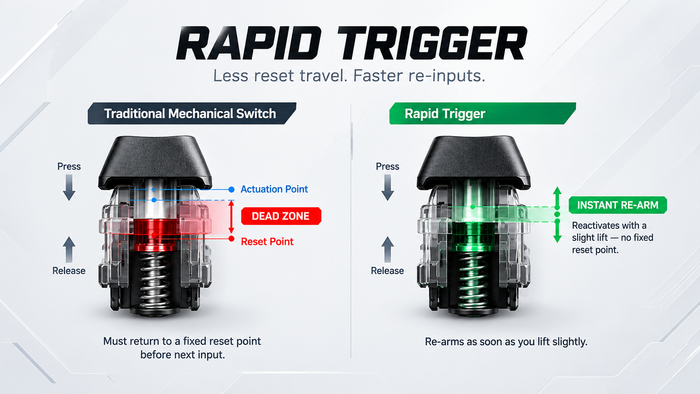
Traditional mechanical switches normally activate and reset around fixed physical points.
Rapid Trigger works differently.
On a compatible Hall Effect magnetic keyboard, the keyboard continuously tracks key position. Instead of waiting for the switch to return past a conventional fixed reset point, Rapid Trigger can release the input after the key begins moving upward by a defined amount.
The key can then become ready to activate again after a small downward movement.
That behavior is especially useful on movement keys such as W, A, S, and D.
Rapid Trigger does not automatically improve your aim, lower your network latency, or replace movement practice. It changes the keyboard-side activation and reset behavior so your input can follow your finger movement more closely.
For the full technical explanation, read our Rapid Trigger Magnetic Keyboard Guide.

Why Rapid Trigger Matters in VALORANT
VALORANT rewards clean movement and controlled stops before accurate shots.
Rapid Trigger can be useful during:
- Fast direction changes
- Jiggle peeks
- Shoulder peeks
- Wide swings
- Micro-adjustments
- Stopping before firing
The goal is not to make every input as sensitive as technically possible.
The goal is to make movement respond quickly while still feeling predictable.
Recommended VALORANT WASD Actuation: 0.2–0.5 mm
A strong starting point is 0.3 mm.
This is shallow enough to feel responsive while still providing some protection against accidental movement.
Players with very controlled fingers may prefer approximately 0.2 mm. If you frequently activate movement keys just by resting your fingers on them, move toward 0.4–0.5 mm instead.
Recommended VALORANT Rapid Trigger: 0.2–0.4 mm
Start at approximately 0.3 mm.
Lower values make the keyboard react to smaller changes in key travel, but they also increase sensitivity to tiny finger movements.
If movement begins to feel unstable or you struggle to hold a direction consistently, increase the RT distance gradually.
Crouch: 0.5–1.0 mm
Crouch can benefit from relatively fast activation, but it normally does not need to be as sensitive as WASD.
Around 0.8 mm is a sensible starting point.
Ability Keys: 1.0–2.0 mm
Do not copy your WASD settings onto every key.
Accidentally activating an ability can be more damaging than pressing the key a fraction of a millimeter later.
For Q, E, C, X and other important ability keys, a deeper actuation point gives you more intentional control.
Spacebar: Around 2.0 mm
The spacebar is large and relatively easy to trigger unintentionally. Keeping jump deeper than your movement keys can reduce unwanted jumps during gunfights.
Suggested VALORANT Rapid Trigger Profile
| Key | Suggested Setting |
|---|---|
| W / A / S / D | 0.3 mm Actuation |
| WASD Rapid Trigger | 0.3 mm |
| CTRL / Crouch | 0.8 mm |
| Shift / Walk | 1.0 mm |
| Abilities | 1.5 mm |
| Ultimate | 2.0 mm |
| Space / Jump | 2.0 mm |
| Windows Key | Maximum travel or Disabled In-Game |
Play several Deathmatch or Practice Range sessions before making another major adjustment.
Change one parameter at a time, test it, and then decide whether the change actually improves your control.
Best Rapid Trigger Settings for CS2
CS2 can also benefit significantly from precise movement-key activation and release.
Because counter-strafing, direction changes, jiggle peeking, and stopping before a shot are closely tied to movement timing, WASD is again the most useful place to start.
If you are moving from a conventional mechanical keyboard, however, we recommend beginning slightly more conservatively.
CS2 WASD Actuation: 0.4–0.7 mm
A safe adaptation range is approximately 0.5–0.7 mm.
This still gives you short key travel while reducing accidental inputs for players who are not yet used to very shallow Hall Effect settings.
If you already have experience with Hall Effect keyboards and good finger control, you may prefer to start closer to 0.3–0.5 mm.
A useful tuning path is:
0.7 mm → 0.6 mm → 0.5 mm → 0.4 mm → 0.3 mm
Stop when lowering the value no longer improves your movement consistency.
CS2 Rapid Trigger Sensitivity: 0.2–0.5 mm
Start at approximately 0.4 mm.
More experienced users can gradually experiment with 0.2–0.3 mm.
Extremely low RT values are not automatically better. Your fingers naturally make small vertical movements while holding a key, and an overly aggressive setting can make input feel less stable.
Suggested CS2 Rapid Trigger Profile
| Key | Suggested Setting |
|---|---|
| W / A / S / D | 0.5–0.6 mm Actuation |
| WASD Rapid Trigger | 0.4 mm |
| CTRL / Crouch | 0.8 mm |
| Shift / Walk | 1.0 mm |
| E / Use | 1.5 mm |
| Utility Keys | 1.5 mm |
| Space / Jump | 1.5–2.0 mm |
| Windows Key | Maximum travel or Disabled In-Game |
Once the profile feels stable, reduce either WASD actuation or Rapid Trigger distance by around 0.1 mm at a time.
Avoid changing both at once. If you change multiple variables together, it becomes much harder to identify which adjustment actually helped—or caused a problem.

Important: Rapid Trigger Is Not the Same as SOCD
This distinction is especially important for Counter-Strike 2.
Rapid Trigger changes when an individual key activates and releases according to that key's physical movement.
SOCD-style features change how a keyboard resolves opposing inputs such as A and D when both are involved.
They are not the same technology.
Valve has restricted hardware-assisted counter-strafing and certain forms of input automation on official Counter-Strike servers. Features marketed as Snap Tap, Snappy Tappy, Last Input Priority, SOCD, or similar opposing-direction resolution systems should therefore be treated separately from normal Rapid Trigger behavior.
See Valve's official Counter-Strike announcement for the current policy context: Counter-Strike 2 — Automating Player Inputs.
Rapid Trigger should not be confused with automatic counter-strafe functionality.
Should You Use 0.1 mm Rapid Trigger?
You can.
That does not mean you should.
A value such as 0.1 mm looks impressive because the keyboard responds to extremely small changes in movement.
But your fingers are not perfectly motionless.
With extremely sensitive settings, tiny changes in finger pressure can lead to unintended activation or release behavior.
This may cause:
- Accidental movement
- Unwanted key activation
- Inconsistent strafing
- Difficulty holding a direction
- Accidental inputs while resting your fingers
Think of 0.1 mm as part of the available tuning range—not a target every player needs to reach.

Actuation Point vs Rapid Trigger: What's the Difference?
Actuation Point
Actuation determines how far you need to press a key before the input activates.
Lower value: the input activates earlier in the key travel.
Higher value: you need to press farther before activation.
Rapid Trigger
Rapid Trigger controls how little movement is required for a pressed key to reset and become ready to activate again as the direction of key travel changes.
That is why a useful FPS configuration normally combines relatively shallow actuation with controlled Rapid Trigger settings rather than simply setting every available value to minimum.
Should Every Key Use the Same Actuation?
No.
One of the most useful advantages of a Hall Effect keyboard is per-key customization.
A practical FPS profile could use:
- Very sensitive: WASD
- Medium: Crouch, Walk, Weapon Switching
- Deeper: Abilities, Utility, Interact, Reload
- Deepest: Ultimate, Windows Key, Escape
This gives you responsive movement without turning the entire keyboard into a hair trigger.
How We Chose These Rapid Trigger Settings
These recommendations are practical starting points rather than universal “pro settings.”
We considered four main factors:
- Movement keys benefit more from fast activation and reset behavior than most utility keys.
- Extremely shallow actuation and RT values can increase accidental inputs.
- VALORANT and CS2 both reward precise movement control, but their movement systems and player preferences are not identical.
- Hall Effect keyboards vary in sensor implementation, switch characteristics, firmware, calibration, driver terminology, and available adjustment increments.
For that reason, we recommend beginning with a controlled range and changing settings gradually instead of immediately applying the minimum supported value to every key.
How to Find Your Own Best Rapid Trigger Setting
Step 1: Start Conservative
VALORANT:
WASD Actuation: 0.3–0.5 mm
Rapid Trigger: 0.3–0.4 mm
CS2:
WASD Actuation: 0.5–0.7 mm for new Hall Effect users, or 0.3–0.5 mm for experienced users
Rapid Trigger: 0.3–0.5 mm
Step 2: Test in Real Gameplay
Do not judge a setting only by tapping keys on your desktop.
Test the profile in Practice Range, Deathmatch, aim maps, or your normal game mode.
Pay attention to:
- Direction changes
- Wide swings
- Jiggle peeks
- Holding movement keys
- Accidental movement
- Stopping before shooting
- Counter-strafing in CS2
Step 3: Change One Setting
Adjust either actuation or Rapid Trigger by approximately 0.1 mm.
Do not change both at the same time.
Step 4: Test Again
If movement becomes more responsive without becoming inconsistent, keep the change.
If you begin moving or releasing inputs unexpectedly, move the value back up.
Step 5: Save Separate Profiles
VALORANT and CS2 do not need identical keyboard profiles.
If your keyboard software supports multiple configurations, save separate profiles for each game instead of forcing one setup to work everywhere.
Does 8K Polling Matter With Rapid Trigger?
Polling rate and Rapid Trigger affect different parts of the input chain.
Rapid Trigger affects when a key activates and resets.
Polling rate affects how frequently the keyboard can report input to the PC.
An 8,000 Hz keyboard can report updates more frequently than a traditional 1,000 Hz keyboard, but a higher polling-rate number by itself does not guarantee lower total input latency.
Sensor behavior, firmware, scan implementation, calibration, USB behavior, and system conditions can also affect the final result.
For a deeper explanation, read 256K Scan Rate Explained: Keyboard Scan Rate vs Polling Rate for FPS Gaming.
Choosing a Hall Effect Keyboard for VALORANT and CS2
Rapid Trigger is most useful when your keyboard gives you enough control to tune it consistently.
When choosing a magnetic gaming keyboard for competitive FPS, consider:
- Adjustable actuation
- Rapid Trigger support
- Stable magnetic sensing
- Published latency specifications
- Polling and scan behavior
- Per-key configuration
- Driver and firmware quality
- Switch feel
- The layout that fits your desk and workflow
TITAN 75 Turbo at FGG
The TITAN 75 Turbo is suited to players who want Hall Effect gaming features without giving up the function row, dedicated arrow keys, and everyday usability.
- 75% 81-key layout
- Hall Effect magnetic switches
- 8,000 Hz polling rate
- 0.08 ms published latency
- 0.001 mm published RT precision
- 25,600 Hz published scan rate
- 5-layer internal dampening
The 75% layout makes it a practical option for players who use the same keyboard for FPS games, browsing, spreadsheets, editing, or general desktop work.
Specification note: The latency, RT precision, and scan-rate figures above are published product specifications and should not be interpreted as independent FGG laboratory measurements.
Explore TITAN 75 Turbo at FGG →
MAD60/68 V2 at FGG
For players who prioritize mouse space, the MAD60/68 V2 offers compact 60% and 68-key configurations with Hall Effect magnetic input.
- 60% / 68-key layout options
- Hall Effect magnetic switches
- 8,000 Hz polling
- 0.08 ms published latency
- 0.001 mm published RT precision
- Hot-swappable magnetic switches
- Web-based configuration
- Scan-rate specification varies by listed configuration
The smaller footprint is particularly useful for low-sensitivity FPS players who want more physical space for large mouse movements.
Specification note: FGG product information lists different scan-rate figures across MAD60/68 V2 configurations, so check the current product page for the exact version you are considering.
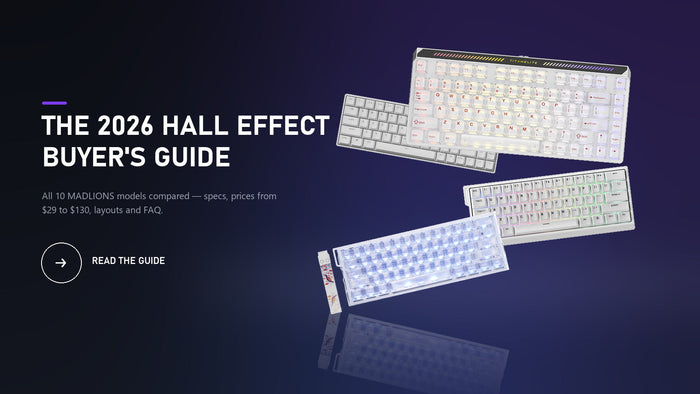
Not sure which layout fits your setup? Read our 2026 Hall Effect Keyboard Buyer's Guide for a wider comparison.
FAQ
What is the best Rapid Trigger setting for VALORANT?
A good starting point is approximately 0.2–0.5 mm WASD actuation with around 0.2–0.4 mm Rapid Trigger movement distance.
If this is your first Hall Effect keyboard, start toward the higher end of the range and reduce the values gradually.
What is the best Rapid Trigger setting for CS2?
Players moving from a conventional mechanical keyboard can begin around 0.5–0.7 mm WASD actuation with approximately 0.3–0.5 mm Rapid Trigger.
More experienced Hall Effect users may prefer WASD actuation closer to 0.3–0.5 mm.
Is 0.1 mm Rapid Trigger better?
Not necessarily.
Lower values react to smaller movements, but they also make the keyboard more sensitive to unintended finger movement.
The best setting is the lowest value you can control consistently without creating accidental input.
Should Rapid Trigger be enabled on every key?
Usually not.
For tactical FPS games, WASD normally receives the clearest benefit. Abilities, utility, interact keys, reload, and other important controls can use deeper and more deliberate settings.
Does Rapid Trigger improve aim?
Rapid Trigger does not improve mouse aim directly.
Its main benefit is keyboard movement control. Cleaner input release can make the transition from movement to a stationary shot feel more predictable, but aim, crosshair placement, positioning, timing, and decision-making still depend on the player.
Is Rapid Trigger allowed in CS2?
Rapid Trigger and automatic opposing-direction input resolution are different technologies.
Valve restricts certain forms of hardware-assisted counter-strafing and input automation on official Counter-Strike servers. Rapid Trigger should therefore not be treated as interchangeable with SOCD, Snap Tap, Last Input Priority, or similar features that automatically resolve opposing movement inputs.
Always check the latest official Counter-Strike rules before enabling input-automation features.
Is Rapid Trigger worth using in VALORANT?
For players using a compatible Hall Effect keyboard, Rapid Trigger can be useful for quick direction changes, stopping, strafing, and peeking.
However, consistency matters more than simply choosing the smallest number your keyboard supports.
Is 8K polling the same as Rapid Trigger?
No.
Rapid Trigger changes key activation and reset behavior. Polling rate describes how frequently the keyboard can communicate input updates to the computer.
They operate at different stages of the input chain.
Final Takeaway
For VALORANT, a practical starting range is:
0.2–0.5 mm WASD actuation + 0.2–0.4 mm Rapid Trigger
For CS2, a slightly more conservative starting range is:
0.4–0.7 mm WASD actuation + 0.2–0.5 mm Rapid Trigger
Experienced Hall Effect users can experiment closer to 0.3–0.5 mm actuation in CS2 once they are comfortable with shallow inputs.
Change one setting at a time and test it during real gameplay rather than judging the keyboard only from the configuration screen.
The goal is not to reach the smallest possible number. The goal is to make movement respond as quickly as possible without sacrificing control.
FGG Editorial Transparency: This article is maintained by the FGG Editorial Team and is intended to provide practical gaming-peripheral guidance rather than a universal competitive preset. FGG sells products linked in this article, so product sections should not be interpreted as independent third-party recommendations. Unless explicitly stated otherwise, hardware figures such as latency, polling rate, scan rate, and Rapid Trigger precision are published product specifications rather than independent laboratory measurements. Game rules, firmware, drivers, and product specifications can change, and this guide should be reviewed when material changes occur.