

What Rapid Trigger Actually Does and Why It Matters
TL;DR
Rapid Trigger resets a key the moment your finger starts lifting, instead of waiting for the switch to return to a fixed reset point. That means the same key can re-fire faster during repeated taps, counter-strafes, and micro-adjustments.
FGG Editorial Note: This guide is prepared by FGG Editorial for players comparing gaming gear and settings. Recommendations reflect the information and product specifications available on the update date; test settings on your own setup.
- It only works on magnetic switches, such as Hall Effect or TMR switches, because they can continuously track key position.
- It matters most in competitive games like CS2, Valorant, Apex Legends, Fortnite, and rhythm games.
- It does not help much with typing, RPGs, MMOs, or casual single-player games. In those cases, it can even make accidental inputs more likely.
- The key settings are Rapid Trigger sensitivity and actuation distance. Most players tune RT sensitivity first, then adjust actuation only if needed.
Quick Self-Check: Should You Care About Rapid Trigger?
- If you play ranked CS2 or Valorant and care about counter-strafing, read sections 1–3.
- If you already own a magnetic keyboard and want better settings, skip to section 4.
- If you mostly type, work, or play single-player games, skip to section 5 and the FAQ. Rapid Trigger probably will not change your experience much.
1. The Counter-Strafing Problem
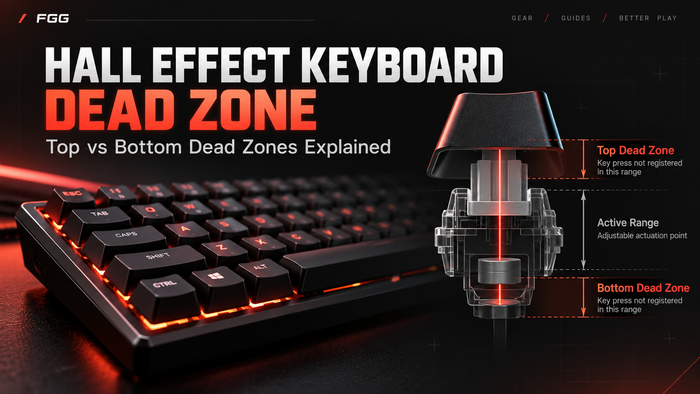
To understand what Rapid Trigger fixes, you first need to understand the input dead zone in a traditional mechanical switch.
Counter-strafing is one of the most important movement techniques in CS2 and Valorant. You move right by holding D, release or counter with A, stop your movement, then shoot. The cleaner your stop is, the faster your first accurate shot can happen.
On a traditional mechanical switch, the key has a fixed actuation point and a fixed reset point. After the key activates, it must physically travel back upward past its reset point before it can activate again. That reset distance creates a small but real input dead zone.
In casual play, this dead zone usually does not matter. But in high-speed duels, repeated ADAD movement, jiggle peeking, and counter-strafing, every release-and-press cycle matters. If the key has not reset yet, your next input may arrive later than your finger movement suggests.
This is a hardware limitation, not just a software setting. A traditional mechanical switch cannot continuously report its exact key position. A magnetic switch can, which is why Rapid Trigger exists in the first place.

2. How Rapid Trigger Works
A magnetic switch, usually Hall Effect or TMR, does not rely on metal contacts closing together. Instead, it uses a magnet and a sensor to track the position of the key during travel.
Because the keyboard can read key position continuously, the firmware can apply a different rule:
Rapid Trigger rule: a key can reset as soon as it moves upward by a defined distance, and it can fire again as soon as it moves downward by that defined distance. It does not need to return to a traditional fixed reset point.
This is why Rapid Trigger feels different from a normal mechanical keyboard. The keyboard is no longer waiting for a switch to fully reset in the old mechanical sense. It is watching motion direction and distance in real time.
Rapid Trigger vs Adjustable Actuation
Rapid Trigger and adjustable actuation are often mentioned together, but they are not the same feature.
| Feature | What It Changes | When It Matters |
|---|---|---|
| Adjustable actuation | How far the key must be pressed before it activates | Useful when you want shallow movement keys and deeper keys for actions like Space or Enter |
| Rapid Trigger | How quickly the key resets and can re-fire after release | Useful for counter-strafing, jiggle peeking, repeated taps, and rhythm timing |
A keyboard can advertise adjustable actuation, Rapid Trigger, or both. Most competitive magnetic keyboards include both, but they solve different problems.

3. Rapid Trigger in Real Games
Scenario 1: Counter-Strafing in CS2 and Valorant
This is where Rapid Trigger is most useful. In tactical FPS games, movement and shooting accuracy are closely connected. Cleaner movement release can make peeking, stopping, and firing feel sharper.
With Rapid Trigger enabled, your movement key can reset during a much smaller upward movement. The next press can register sooner, which helps repeated ADAD movement feel more immediate.
Rapid Trigger will not fix bad aim or poor crosshair placement. But it can remove one layer of keyboard-side delay from movement inputs.
Scenario 2: Aerial Adjustments in Apex Legends and Fortnite
In movement-heavy games, players often tap the same direction key repeatedly for small corrections. Rapid Trigger can make these repeated press-release cycles feel more responsive.
In Fortnite, the same idea applies to fast building, editing, and movement transitions. The benefit is not magic aim improvement. It is cleaner input timing.
Scenario 3: Rhythm and Timing-Based Games
Rhythm games rely on repeated key presses with precise timing. Since Rapid Trigger reduces the reset distance between repeated presses, it can be useful for rhythm games and rhythm-adjacent gameplay.
For players who care about repeated tap accuracy, a well-tuned magnetic keyboard can be a meaningful upgrade.
Where Rapid Trigger Does Not Help
- Typing: Rapid Trigger can make accidental re-fires more likely. Many users turn it off for typing profiles.
- Single-player games: If you are not repeatedly tapping the same key in tight timing windows, Rapid Trigger adds little value.
- RPGs and MMOs: Most abilities are limited by cooldowns, not keyboard reset speed.
- MOBA games: It may help some movement actions, but it is not usually a major advantage compared with FPS games.
4. How to Tune Rapid Trigger
Most Rapid Trigger keyboards expose two main types of settings: Rapid Trigger sensitivity and actuation distance.
| Setting | What It Means | Recommended Starting Point |
|---|---|---|
| Rapid Trigger sensitivity | How much the key must move upward before it resets | 0.1–0.3 mm for competitive FPS |
| Actuation distance | How far the key must be pressed before it activates | 0.5–1.0 mm for WASD movement keys |
| Typing profile | A safer setup for normal typing | RT off, actuation around 1.5–2.0 mm |
A good starting point is 0.2 mm Rapid Trigger sensitivity and around 1.0 mm actuation on WASD. Play for 20–30 minutes, then adjust based on how it feels.
If you experience accidental inputs, raise the Rapid Trigger sensitivity or use a deeper actuation point. If the keyboard feels too slow, lower the values gradually.

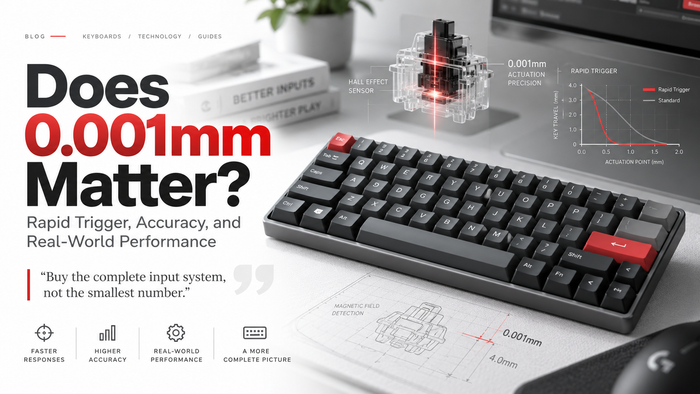
What Does “0.001 mm Rapid Trigger Precision” Mean?
Many magnetic keyboard product pages mention numbers like 0.001 mm Rapid Trigger precision. This is useful, but it is important to understand what the number usually refers to.
In most product descriptions, this number describes the fine adjustment step or firmware-level Rapid Trigger precision, not necessarily the raw physical sensor resolution. In other words, it tells you how precisely the keyboard lets you tune or respond to small movement changes inside the Rapid Trigger system.
The practical takeaway is simple: smaller adjustment steps allow finer tuning. But do not judge a keyboard by one number alone. Switch quality, firmware stability, scan behavior, polling rate, layout, and build quality all affect the real experience.
5. Common Misconceptions About Rapid Trigger
“Rapid Trigger is the same as adjustable actuation.”
No. Adjustable actuation changes where a key first activates. Rapid Trigger changes how quickly it resets and can activate again after release.
“Rapid Trigger makes bad aim better.”
No. Rapid Trigger improves input timing, especially movement timing. It does not improve crosshair placement, recoil control, map awareness, or decision-making.
“Rapid Trigger is cheating.”
No. Rapid Trigger changes how a single key resets. It does not automate inputs. However, features such as SOCD, Snap Tap, or last-input priority are separate and may be restricted in some games or tournaments. Always check the rules of the game you play.
“Any magnetic keyboard has Rapid Trigger.”
Most competitive magnetic keyboards now include Rapid Trigger, but you should still check the product page. Some entry-level models may have limited software features.
“Higher polling rate can replace Rapid Trigger.”
No. Polling rate controls how often the keyboard sends data to the PC. Rapid Trigger controls how the key resets and re-fires. They work at different layers.
Final Takeaway
Rapid Trigger is one specific feature in the magnetic keyboard category, and it solves one specific problem: the dead zone between repeated presses of the same key.
It matters most in games where movement timing is critical, such as CS2, Valorant, Apex Legends, Fortnite, and rhythm games. In those scenarios, Rapid Trigger can make movement inputs feel sharper and more immediate.
For typing, casual gaming, RPGs, and MMOs, Rapid Trigger is usually not necessary. In many cases, a normal profile with Rapid Trigger turned off will feel better.
If you already own a magnetic keyboard, start with Rapid Trigger around 0.2 mm on your movement keys and test it in your main game. If you are buying a new keyboard, choose the layout first, then compare switch feel, firmware, build quality, and tuning features.
FAQ
Is Rapid Trigger just a software trick?
No. Rapid Trigger requires hardware that can continuously read key position, which is why it is associated with magnetic switches. Firmware controls the feature, but the underlying sensor makes it possible.
Can I disable Rapid Trigger for typing?
Yes. Most magnetic keyboards allow different profiles. A common setup is Rapid Trigger on for FPS games and Rapid Trigger off for typing or daily use.
Will Rapid Trigger help me rank up?
It can remove a hardware-side input dead zone from movement keys, but it will not replace aim, positioning, timing, or game sense. It helps most when your movement technique is already solid.
Is Rapid Trigger the same as Snap Tap or SOCD?
No. Rapid Trigger affects how a single key resets. SOCD or Snap Tap affects how the keyboard handles two opposing keys, such as A and D, when both are pressed. These are separate features with separate competitive rules.
Does Rapid Trigger work on wireless keyboards?
Yes, the Rapid Trigger feature can work on wireless magnetic keyboards. However, wireless connection latency is still part of the total input chain. For the lowest possible latency, wired mode is still the safest choice.
Which magnetic keyboard should I buy for Rapid Trigger?
Choose based on layout first. A 60% keyboard gives more mouse space for FPS. A 75% keyboard keeps arrow keys and the function row for daily use. After that, compare tuning software, switch feel, build quality, polling rate, and price.
Choosing a Hall Effect keyboard? Compare Hall Effect Keyboards to find the layout and feature set that fits your setup.
FGG Editorial Standard
FGG Editorial separates manufacturer-published specifications from measured end-to-end performance and does not treat general guidance as a guarantee of the same result for every player or system. FGG sells some products discussed in this article; this relationship does not change the criteria used in the guide. We review this article when relevant product specifications or guidance changes.