

A 68-key Hall Effect keyboard can suit a compact FPS setup when you want dedicated arrow keys without moving to a larger board. Compared with many 60% layouts, those keys are easier to reach; compared with a typical 75%, a compact 65%/68-key design generally leaves out a dedicated function row. Hall Effect sensing can support adjustable actuation and Rapid Trigger, but the implementation, software and published information differ between models.
By FGG Editorial · Updated October 13, 2026. This is a specification-based buying comparison, not a report of independent testing of all six keyboards.
Disclosure: FGG sells some of the MADLIONS keyboards included in this guide. Competitor specifications are based on publicly available manufacturer information and were checked at the time of writing.
Quick Answer
A 68-key Hall Effect keyboard adds dedicated arrow keys to a compact gaming layout, while usually avoiding the extra width and function row of a 75% board. The best 68 key Hall Effect keyboard for your desk depends on layout, software, construction and the configuration you can actually buy. Start with MAD68 Pro if an aluminum, wired FGG option appeals to you; compare MAD68 V2 for lower-cost FGG configurations and TITAN 68 Turbo for its published gaming features. This compact magnetic keyboard comparison also includes EPOMAKER, MelGeek and MonsGeek alternatives. Check actuation and Rapid Trigger support for the exact model, rather than choosing by the smallest advertised number.
Quick Picks
These are use-case labels based on documented differences, not measured performance awards or an overall laboratory ranking.
- FGG aluminum choice: MAD68 Pro. A compact wired Hall Effect model with an aluminum build; confirm the remaining software and trigger details before buying for a specific feature.
- FGG gaming-feature option: TITAN 68 Turbo. Published 8K polling and configurable Rapid Trigger.
- Lower-cost FGG configuration: MAD68 V2. The 68-key version starts at $39.98 among the three FGG picks here.
- Documented alternative: EPOMAKER HE68 Lite. A published 68-key specification table and $49.99 displayed price.
- Premium aluminum / lighting option: MelGeek MADE68 Ultra V2. An aluminum chassis, HIVE 2.0 and a substantially higher listed price.
- Connection-flexibility option: MonsGeek FUN68 HE. Wired and tri-mode versions; confirm which configuration is available.
68-Key Hall Effect Keyboard Comparison
| Keyboard | Layout / Keys | Connection | Polling Rate | Rapid Trigger | Case | Software | Approx. Price | Best For |
|---|---|---|---|---|---|---|---|---|
| MAD68 Pro | 68 / compact class | Wired | Not clearly published / not used for comparison | Not clearly published | Aluminum | Not clearly published | From $43.98 | FGG aluminum option |
| TITAN 68 Turbo | Not clearly published | Not specified | 8,000 Hz | Yes | Not specified | FGG-MADLIONS | Approx. $66.90 | FGG gaming features |
| MAD68 V2 | MAD68 V2 selected; documentation varies by configuration/version | USB-C wired | 8,000 Hz | Yes | Not specified | Custom Web Driver | From $39.98² | Lower-cost FGG pick |
| EPOMAKER HE68 Lite | 68 / 65% ANSI | USB wired | 8,000 Hz | Yes | ABS | Windows / Mac | Approx. $49.99 | Documented alternative |
| MelGeek MADE68 Ultra V2 | 68 | USB (documented mode) | 8,000 Hz | Yes | Aluminum alloy | HIVE 2.0 | Approx. $219 | Premium case / lighting |
| MonsGeek FUN68 HE | 68 / 65% | Wired / tri-mode SKU | 8,000 Hz USB / 2.4 GHz | Yes | Not clearly published | V4 Web Driver | Approx. $34.99–49.99³ | Connection options |
MAD68 Pro polling, scan rate, latency and RT precision are not used for comparison because they are not clearly published on its current product page. ² MAD68 V2 pricing refers to the selected MAD68 V2 configuration, not the MAD60 version. Manufacturer documentation varies by configuration/version. ³ FUN68 pricing is a series range; a specific connection/stock combination was not confirmed. “Not specified” means the checked source did not clearly publish the field.
Prices may change by configuration and region. USD prices were checked October 13, 2026 and are not promises of tax, shipping or regional availability. The checked MAD68 Pro, TITAN 68 Turbo and exact MAD68 V2 configurations displayed Add to Cart. EPOMAKER and MelGeek displayed Add to Cart for the shown configurations; MonsGeek stock could not be confirmed by configuration.
MAD68 Pro — FGG Aluminum Choice

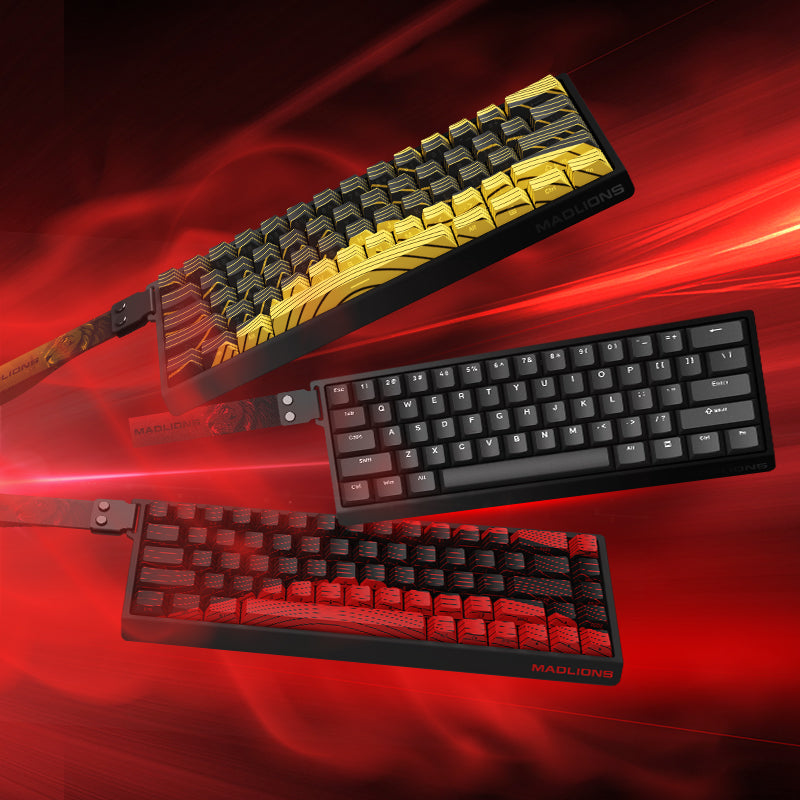
FGG product image: Gradient Pink configuration, listed at $54.98 when checked. The $43.98 starting price refers to a different switch/color configuration.
Best For
Buyers who want a wired, compact Hall Effect keyboard with an aluminum build and a choice of FGG configurations. MAD68 Pro is our main FGG product route in this comparison, rather than a claim that it is the fastest board on the market.
Key Specs
- 68-key layout; wired connection; Hall Effect magnetic switches; aluminum construction.
- From $43.98 for Magnetic Silver Esport / Black; the pictured Gradient Pink / Gateron Jade Esport Pro configuration was $54.98. Check the chosen variant rather than applying the starting price to every option.
- The earlier MAD68 Pro model introduction provides background. For this comparison, polling, scan rate, latency and RT precision remain not clearly published / not used for comparison; a precise actuation range, model-specific Rapid Trigger description and current software route are also not clearly established by the current product page.
What Stands Out
The practical distinction is aluminum construction at a lower listed entry price than the premium aluminum competitor here. Choose the switch and color you want, rather than expecting every version to share the starting price.
Trade-Offs
It is wired. The checked product information leaves some trigger/software details unclear, so confirm those with FGG before buying specifically for a particular configuration feature. We have not independently benchmarked it against the competitors.
Who Should Buy It
Start here if construction and a compact arrow-key layout are your priorities and a wired setup suits your desk. Compare MAD68 Pro configurations.
TITAN 68 Turbo — FGG Gaming-Feature Option

Best For
Players choosing a compact model with clearly named Rapid Trigger controls and FGG software support. Confirm the connection requirement before buying.
Key Specs
Hall Effect switches, published 8,000 Hz polling and adjustable actuation / Rapid Trigger controls. The displayed White / Magneto RGB configuration was $66.90. The exact key count, connection, numeric actuation range and case material were not clearly published in the checked model description.
What Stands Out
The product page explicitly connects its gaming functions to FGG-MADLIONS software. This is a clearer feature route than an unspecified trigger field.
Trade-Offs
The plate option is not evidence of a carbon-fiber case. Published scan/latency claims are not comparable end-to-end measurements, so this guide does not rank its real-world speed.
Who Should Buy It
Consider it if the documented controls and switch/plate choices meet your requirements. View TITAN 68 Turbo options.
MAD68 V2 — Lower-Cost FGG Configuration

Best For
Buyers choosing among these FGG options who want the lower starting price while keeping the 68-key layout.
Key Specs
Hall Effect, wired USB-C, published 8K polling and Rapid Trigger. The current page labels 0.001 mm as RT precision; it does not establish a full actuation range or measured gaming latency. The selected White / White Stallion / MAD68 V2 configuration was $39.98 when checked.
What Stands Out
It provides a lower-cost route to the documented magnetic features without changing to a 60% layout.
Trade-Offs
The shared product page contains both MAD60 and MAD68 configurations. Manufacturer documentation varies by configuration/version. Case material and actuation range are left unspecified here rather than inferred from the finish or a different version.
Who Should Buy It
Choose it if the exact 68-key SKU meets your budget. Check the MAD68 V2 configuration on the MAD60/68 V2 page.
EPOMAKER HE68 Lite — Documented Alternative
Best For
Buyers who want a wired alternative with an explicit technical specification list.
Key Specs
68 keys, 65% ANSI, Hall Effect Clear Mag switches, USB wired, 8,000 Hz polling, adjustable trigger, 0.1–3.4 mm published adjustable travel, ABS case and Windows/Mac software. The displayed configuration was $49.99.
What Stands Out
Its official page makes the layout, materials and adjustment range easy to check, and explicitly documents SOCD, DKS and Mod-Tap. These configuration functions offer a different reason to compare it with the FGG options.
Trade-Offs
It is wired and uses ABS rather than an aluminum case.
Who Should Buy It
Consider it if those documented features meet your needs. Verify HE68 Lite specifications and stock with EPOMAKER.
MelGeek MADE68 Ultra V2 — Premium Aluminum / Lighting Option
Best For
Buyers who prioritize construction and a configurable lighting system over a low purchase price.
Key Specs
68 keys, Hall Effect magnetic switches, USB connection, 8,000 Hz polling, aluminum-alloy chassis and HIVE 2.0. Published adjustable switch travel is 0.1–3.4 mm; RT is separately listed at 0.01–2.5 mm. The displayed configuration was $219.
What Stands Out
The aluminum chassis and lighting ecosystem distinguish its product positioning.
Trade-Offs
It costs substantially more than the other listed starting prices; that does not prove better gaming performance.
Who Should Buy It
Consider it for those build/design priorities. Check the current MADE68 Ultra V2 configuration.
MonsGeek FUN68 HE — Connection-Flexibility Option
Best For
Buyers comparing wired and wireless configurations in the same compact class.
Key Specs
68 keys, Hall Effect, Rapid Trigger, 0.1–3.3 mm actuation and V4 Web Driver. The series lists wired and tri-mode options, with 8K in USB/2.4 GHz modes. Listed pricing was $34.99–49.99; exact configuration stock was not confirmed.
What Stands Out
The connection options offer a different purchasing choice from wired-only models.
Trade-Offs
Case material is not clearly specified; the aluminum plate does not establish it. Magnetic switch compatibility needs checking.
Who Should Buy It
Consider it after verifying the connection SKU and availability. Review FUN68 HE with MonsGeek.
Alternatives Outside the Primary Six
NANO68 V2: Still relevant for readers interested in its lighting and compact layout, but outside this six-product shortlist. Read the existing NANO68 V2 product overview for its layout and lighting context.
Keychron K6 HE: A useful alternative for mixed gaming and work, with a compact 65% layout, Rapid Trigger, QMK / Launcher and USB-C, 2.4 GHz and Bluetooth connectivity. Its current official page identifies TMR sensors despite the HE model name, so we keep it outside the strict Hall Effect six rather than describing it as the same sensor type. The displayed Special Edition was approximately $139.99 and marked backordered. If multi-device support matters more than the shortlist's price or polling spread, compare K6 HE on Keychron's official page. A lower advertised polling rate is not proof of worse gaming performance.
How We Compared These Keyboards
FGG Editorial compared manufacturer-published information and current FGG configuration listings on October 13, 2026. We considered physical layout and arrow-key access, Hall Effect / Rapid Trigger features, published polling, construction, software information, configuration price and availability. The three FGG product images above were checked against their variant data.
We did not independently test all six keyboards, measure their latency, score their software reliability or evaluate their long-term durability for this guide. Polling, internal scanning, adjustment resolution and end-to-end latency are different metrics. Specifications are sourced from the model links in the table and product sections. Unclear fields remain unspecified; stock/price observations can change.
68-Key vs 60% Hall Effect Keyboards
Many 60% keyboards prioritize desk space by moving arrows and navigation to a function layer. A compact 68-key-class layout commonly adds dedicated arrow keys, making text editing and mixed gaming/work use easier to navigate without a full-size board. Both still require checking how function shortcuts work on the exact model. A smaller board does not automatically make you better at FPS games; choose around your mouse space and daily key use.
68-Key vs 75% Hall Effect Keyboards
A typical 75% keyboard keeps a dedicated F-row and more navigation access; compact 65%/68-key designs usually prioritize width instead. “68-key,” “65%” and “68%” are not interchangeable guarantees of a specific key map. Check the actual diagram, and choose a 75% if you frequently need direct F-keys. For the broader trade-offs, use the existing 60% vs 75% keyboard layout guide.
Read the Specification Before the Number
Adjustment steps, trigger ranges, polling, scanning and latency describe different parts of a keyboard. Read the metric definition before comparing two advertised numbers:
| Specification | What it describes | What it does not prove |
|---|---|---|
| Adjustment step / stated precision | How a setting or accuracy claim is expressed; terminology varies | Equivalent physical sensor accuracy across models |
| Actuation and RT ranges | Travel settings for activation or movement-based reset; different controls | Greater precision merely because a range is larger |
| Polling rate | How often inputs can be reported in the named connection mode | The internal scan rate or total keyboard-to-screen latency |
| Internal scanning | Manufacturer-described sensing behavior | A directly comparable end-to-end gaming measurement |
| Advertised latency | A manufacturer result with its own conditions and measurement boundary | The same response on every computer or independent FGG testing |
For the detailed distinction, read the existing keyboard scan-rate and polling-rate explanation; this buying comparison does not rank the six by those headline numbers.
What to Look for in a 68-Key Hall Effect Keyboard
- Trigger controls: Confirm whether Rapid Trigger and per-key adjustable actuation are explicitly supported. An RT step size is not the full actuation range.
- Software and calibration: Check the correct model driver, supported operating system, calibration instructions and firmware route. We have not tested software reliability across all six.
- Polling: Compare the mode you will use. A USB rate does not automatically apply to Bluetooth; higher advertised rates alone do not prove lower keyboard-to-game latency.
- Construction and layout: Read case and plate materials separately. Check arrows, navigation, height and any shortcuts you use daily.
- Switch compatibility: Magnetic switches are not universally interchangeable. Verify the model's supported switches and calibration procedure before replacement.
- Connection, support and price: Confirm the exact SKU, stock and support resources, not only a product-family starting price. Paper specifications are only part of a buying decision.
For the mechanism, read the Rapid Trigger guide. For tuning after purchase, use the Rapid Trigger settings guide for VALORANT and CS2. FGG models that link to the Hub can use FGG Hub for the appropriate software route; check model compatibility rather than assuming one driver supports every keyboard.
Opposing-input priority and multi-action functions are separate from normal Rapid Trigger. Confirm the current rules of your game or event before enabling them. For terminology, use the existing DKS, SOCD, Mod-Tap and TGL explanation.
Frequently Asked Questions
What is a 68-key keyboard?
It is a keyboard described by its key count. Compact models in this class commonly keep arrows and selected navigation keys, but the exact map depends on the manufacturer.
Is a 68-key keyboard the same as 65%?
Many 68-key boards fall into the compact 65% class. Percentage labels are approximate layout categories, so inspect the diagram instead of assuming identical keys or dimensions.
Are 68-key keyboards good for FPS games?
They can suit a compact mouse-and-keyboard setup while retaining direct arrow-key access. The right choice depends on your shortcuts, desk space, software and trigger needs; no layout guarantees a competitive advantage.
Is 0.001 mm better than 0.01 mm?
Not automatically. First check whether the number describes an adjustment step, stated accuracy, actuation sensitivity or a Rapid Trigger range. These are different measurements; a smaller advertised setting does not establish a better sensor or lower complete-system latency.
Is 8K polling necessary?
No. It shortens the theoretical report interval compared with 1K in the supported connection mode, but scanning, firmware, CPU scheduling, game frame rate and the rest of the input pipeline also affect responsiveness. We have not measured the six keyboards' end-to-end latency.
What is Rapid Trigger?
It changes activation/reset behavior according to key movement rather than relying only on fixed switching positions. Its availability and adjustment controls depend on the model and firmware; it is not a promise of higher FPS or a measured win rate.
Choose Around Your Desk, Then Your Configuration
Start with MAD68 Pro if its aluminum build and wired compact layout match your needs; confirm its remaining trigger/software details when those are essential. Compare the lower-cost MAD68 V2 configuration and TITAN 68 Turbo's documented controls, then weigh the EPOMAKER, MelGeek and MonsGeek alternatives against their listed materials, connection choices and prices. There is no single measured winner in this specification-based guide.
Explore MAD68 Pro configurations →
For choosing within the wider MADLIONS lineup, see the separate MADLIONS buyer guide. This six-product article stays focused on compact cross-brand comparison.