

⚡ Looking for the latest generation? Check out our newly released MAD60 V2 (with ultra-low latency & upgraded switches) and the all-new 75% flagship TITAN 75 Turbo!
FN+Combination Key (Window)
FN+Combination Key (Mac)
Connectivity
Use the USB cable of this product to connect to the Type-C port of the keyboard and the USB-A port on the device.
The keyboard light will light up when the connection is successful.
🚀 Ready for the Next-Gen Performance?
Loving your current keyboard but looking for the ultimate competitive edge? Meet our latest 2026 flagships:
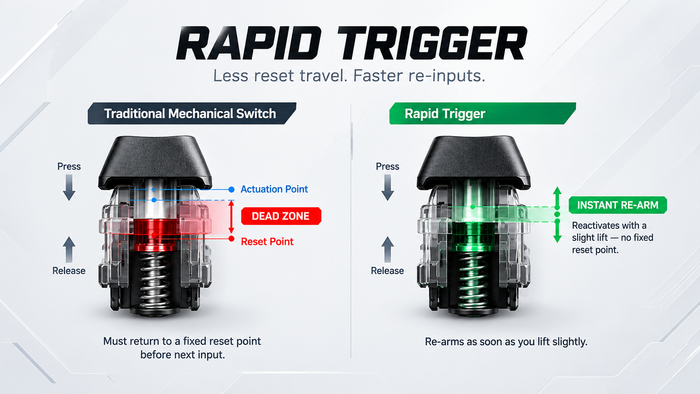
MAD60 V2 Hall Effect Keyboard → The esports weapon reborn. Featuring upgraded magnetic switches, refined acoustic dampening, and true 0.01mm Rapid Trigger accuracy for millimeter-precise counter-strafing.
TITAN 75 Turbo Hall Effect Keyboard → The complete performance setup. Designed for players who demand arrow keys and the F-row without sacrificing Hall Effect esports speed. Premium sound, gasket mounting, and uncompromising build quality.
Official MADLIONS Resources